Recursion

|

|
Execute the following two cells for the setup:
What Is Recursion?
The Three Laws of Recursion
Tower of Hanoi
Exploring a Maze
5.2 What Is Recursion?
Recursion is a method of solving problems that involves breaking a problem down into smaller and smaller subproblems until you get to a small enough problem that it can be solved trivially.
Usually recursion involves a function calling itself. It allows us to write elegant solutions to problems that may otherwise be very difficult to program!
5.3 Calculating the Sum of a Vector of Numbers
Suppose that you want to calculate the sum of a vector of numbers such as: {1, 3, 5, 7, 9}. An iterative function that computes the sum is shown below. The function uses an accumulator variable (theSum) to compute a running total by starting with 0 and adding each number in the vector.
#include <iostream>
#include <vector>
using namespace std;

int listSum(const vector<int>& numList) {
    int theSum = 0;
    for (int value : numList) {
        theSum += value;
    }
    return theSum;
}

int main() {
    cout << listSum({1, 3, 5, 7, 9}) << endl;
    cout << listSum({}) << endl;   // the empty vector sums to 0
    return 0;
}
25
0
The function uses an accumulator variable (theSum) to compute a running total. Passing the vector by const reference avoids copying it and promises not to modify it.
Without loops, how would you compute the sum of a vector of numbers?
You might start by recalling that addition is a function that is defined for two parameters, a pair of numbers. To redefine the problem from adding a vector to adding pairs of numbers, we could rewrite the vector as a fully parenthesized expression. Such an expression looks like this:

Notice that the innermost set of parentheses, $(7+9)$, is a problem that we can solve without a loop or any special constructs! In fact, we can use the following sequence of simplifications to compute a final sum:
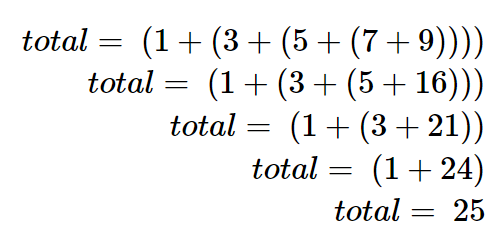
First, restate the sum problem for a C++ vector. The sum starting at index i is numList[i] plus the sum starting at i + 1. When i == numList.size(), the remaining range is empty and its sum is 0. Passing one vector plus an index avoids allocating a new sub-vector at every call.

#include <cstddef>
#include <iostream>
#include <vector>
using namespace std;

int listSumFrom(const vector<int>& numList, size_t index) {
    if (index == numList.size()) {
        return 0;                              // empty remaining range
    }
    return numList[index] + listSumFrom(numList, index + 1);
}

int listSum(const vector<int>& numList) {
    return listSumFrom(numList, 0);
}

int main() {
    cout << listSum({1, 3, 5, 7, 9}) << endl;
    cout << listSum({}) << endl;               // safe: prints 0
    return 0;
}
25
0
listSumFromstops whenindex == numList.size(). This base case represents an empty remaining range, whose sum is 0, so it also makeslistSum({})safe.The recursive call advances
indexby one. The same vector is passed byconstreference, so recursion does not copy or modify it.
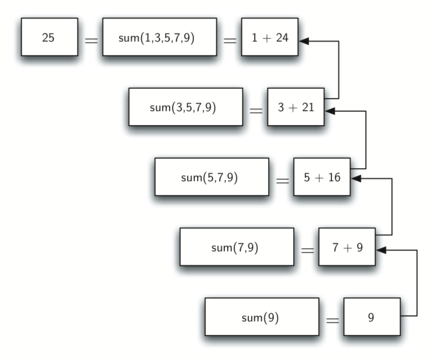
Figure below shows the series of recursive calls that are needed to sum the vector. You should think of this series of calls as a series of simplifications.
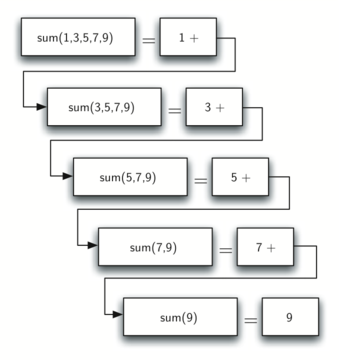
When we reach the point where the problem is as simple as it can get, we begin to piece together the solutions of each of the small problems until the initial problem is solved!
5.4 The Three Laws of Recursion
Like robots in Asimov's stories, all recursive algorithms must obey three important laws:
- A recursive algorithm must have a base case.
- A recursive algorithm must change its state and move toward the base case.
- A recursive algorithm must call itself recursively.
A base case is a problem small enough to solve directly. In listSumFrom(), the base case is an empty remaining range (index == numList.size()), whose sum is 0.
A change of state means moving toward the base case. listSumFrom() keeps the vector fixed and advances index, so the unprocessed range becomes shorter on every recursive call.
The final law is that the algorithm must call itself. This is the very definition of recursion.
As a novice programmer, you have learned that functions are good because you can take a large problem and break it up into smaller problems. The smaller problems can be solved by writing a function to solve each problem.
When we talk about recursion it may seem that we are talking ourselves in circles. We have a problem to solve with a function, but that function solves the problem by calling itself! We are solving a problem by breaking it down into a smaller and easier problems.
display_quiz(path+"recursive1.json", max_width=800)
display_quiz(path+"recursive2.json", max_width=800)
5.5 Converting an Integer to a String in Any Base
Suppose you want to convert an integer to a string in some base between binary and hexadecimal. For example, convert the integer 10 to its string representation in decimal as "10", or to its string representation in binary as "1010".
While there are many algorithms to solve this problem, including the algorithm discussed in the stack section, the recursive formulation of the problem is very elegant.
Let's look at a concrete example using base 10 and the number 769. Suppose we have a sequence of characters corresponding to the first 10 digits, like convertString = "0123456789". It is easy to convert a number less than 10 to its string equivalent by looking it up in the sequence.
If we can arrange to break up the number 769 into three single-digit numbers, 7, 6, and 9, then converting it to a string is simple. A number less than 10 sounds like a good base case.
Knowing what our base is suggests that the overall algorithm will involve three components:
Reduce the original number to a series of single-digit numbers.
Convert the single digit-number to a string using a lookup.
Concatenate the single-digit strings together to form the final result.
The next step is to figure out how to change state and make progress toward the base case.
Let's consider what mathematical operations might reduce a number. The most likely candidates are division and subtraction. While subtraction might work, it is unclear what we should subtract from what. Integer division with remainders gives us a clear direction!
Using integer division to divide 769 by 10, we get 76 with a remainder of 9. This gives us two good results.
- The remainder is a number less than our base that can be converted to a string immediately by lookup.
- We get a number that is smaller than our original and moves us toward the base case of having a single number less than our base.
Now our job is to convert 76 to its string representation. Again we will use integer division plus remainder to get results of 7 and 6 respectively.
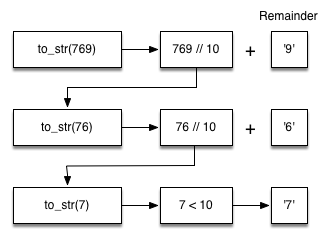
Notice that the numbers we want to remember are in the remainder boxes along the right side of the diagram!
#include <iostream>
#include <string>
using namespace std;

// The algorithm outlined above for any base between 2 and 16.
string toStr(int n, int base) {
    string convertString = "0123456789ABCDEF";
    if (n < base) {
        return string(1, convertString[n]);
    } else {
        return toStr(n / base, base) + convertString[n % base];
    }
}

int main() {
    cout << toStr(1453, 16) << endl;
    return 0;
}
5AD
Notice that in line 3 we check for the base case where n is less than the base we are converting to. When we detect the base case, we stop recursing and simply return the string from the convertString sequence.
In line 6 we satisfy both the second and third laws – by making the recursive call and by reducing the problem size–using division.
Let's trace the algorithm; this time we will convert the number 10 to its base 2 string representation ("1010"):
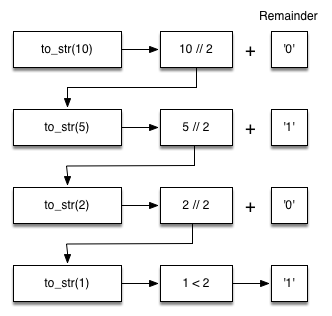
It looks like the digits are in the wrong order. The algorithm works correctly because we make the recursive call first on line 6, then we add the string representation of the remainder.
If we reversed returning the convertString lookup and returning the toStr() call, the resulting string would be backward! But by delaying the concatenation operation until after the recursive call has returned, we get the result in the proper order! This should remind you of our discussion of stacks back in the previous chapter.
Exercise: Write a function using recursion that takes a string as a parameter and returns a new string that is the reverse of the old string.
#include <cassert>
#include <string>
using namespace std;
string reverse(string s) {
    if (s.size() <= 1) {
        return ____;            // handles "" and one character
    }
    return ____ + s[0];
}
int main() {
    assert(reverse("") == "");
    assert(reverse("hello") == "olleh");
}
/tmp/tmpizioudnl.cpp: In function ‘std::string reverse(std::string)’:
/tmp/tmpizioudnl.cpp:8:16: error: ‘____’ was not declared in this scope
    8 |         return ____;
      |                ^~~~
/tmp/tmpizioudnl.cpp:10:12: error: ‘____’ was not declared in this scope
   10 |     return ____ + s[0];
      |            ^~~~

    ... (truncated; run the cell to see the full message)
display_quiz(path+"reverse.json", max_width=800)
5.6 Stack Frames: Implementing Recursion
Suppose that instead of concatenating the result of the recursive call to toStr() with the string from convertString, we modified our algorithm to push the strings onto a stack instead of making the recursive call:
Using the STL stack, we can replace recursion with an explicit stack of characters:
#include <iostream>
#include <stack>
#include <string>
using namespace std;

string toStr(int n, int base) {
    stack<char> rStack;
    string convertString = "0123456789ABCDEF";
    while (n > 0) {
        rStack.push(convertString[n % base]);
        n = n / base;
    }
    string res = "";
    while (!rStack.empty()) {
        res = res + rStack.top();
        rStack.pop();
    }
    return res;
}

int main() { cout << toStr(1453, 16) << endl; }
5AD
Each time we make a call to toStr(), we push a character on the stack. Returning to the previous example we can see that after the fourth call to toStr() the stack would look like Figure below:
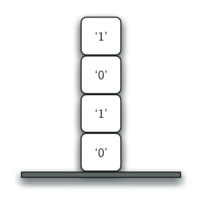
Notice that now we can simply pop the characters off the stack and concatenate them into the final result, "1010".
The previous example gives insight into how C++ implements recursive calls. For each active function call, the runtime maintains a stack frame containing the call's parameters, local variables, and return information.
When the function returns, the return value is left on top of the stack for the calling function to access.
Figure below illustrates the call stack after the return statement:
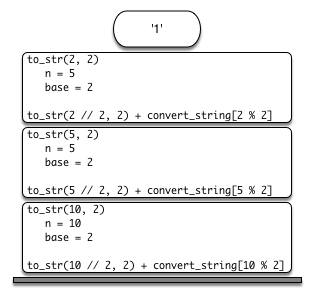
The call toStr(2 / 2, 2) returns "1". That value is substituted into toStr(1, 2) + convertString[2 % 2], producing "10" before the earlier calls continue returning.
In this way, the C++ call stack takes the place of the stack we used explicitly. In our vector summing example, you can think of the return value on the stack taking the place of an accumulator variable.
The stack frames also provide a scope for the variables used by the function. Even though we are calling the same function over and over, each call creates a new scope for the variables that are local to the function.
#include <iostream>
#include <string>
#include <cstdio>
using namespace std;

int depth = 0;   // track the recursion depth explicitly

string toStr(int n, int base) {
    depth++;
    printf("  depth=%d, n=%d\n", depth, n);
    string convertString = "0123456789ABCDEF";
    if (n < base) {
        return string(1, convertString[n]);
    }
    return toStr(n / base, base) + convertString[n % base];
}

int main() {
    cout << toStr(10, 2) << endl;
    return 0;
}
depth=1, n=10
depth=2, n=5
depth=3, n=2
depth=4, n=1
1010
5.7. Introduction: Visualizing Recursion
It can still be difficult to find a mental model or a way of visualizing what is happening in a recursive function. This can make recursion difficult for people to grasp.
In this section we will look at a couple of examples of using recursion to draw some interesting pictures. As you watch these pictures take shape you will get some new insight into the recursive process.
The cppds C++ examples use the header-only CTurtle.hpp library. A cturtle::TurtleScreen owns the drawing window and a cturtle::Turtle moves within it. These listings are non-executing examples because the notebook kernel is configured for console programs; the existing figures below preserve the visual result.
Here is a simple example to illustrate some turtle graphics basics. We will use the turtle module to draw a spiral recursively. The base case for this simple function is when the length of the line we want to draw is reduced to zero or less. If the length of the line is longer than zero, we instruct the turtle to go forward by len units and then turn right 90 degrees.
(C++ CTurtle reference listing — not executed in the notebook.)
#include <CTurtle.hpp>
namespace ct = cturtle;

void spiral(ct::Turtle& turtle, int length) {
    if (length > 0) {
        turtle.forward(length);
        turtle.right(90);
        spiral(turtle, length - 5);
    }
}

int main() {
    ct::TurtleScreen screen;
    ct::Turtle turtle(screen);
    spiral(turtle, 100);
    screen.bye();
}
To run this example locally, place CTurtle.hpp beside the source file and compile it as a desktop C++ program. The notebook keeps it non-executing so opening the slides never launches a GUI window.
The recursive step calls spiral() with a smaller length. When the length reaches zero or less, the function returns; screen.bye() closes the CTurtle window after the drawing completes.
For our next program we will turn to fractals. Fractals come from a branch of mathematics, and have much in common with recursion.
By definition, a fractal has the same basic shape no matter how much you magnify it. Some examples from nature are the coastlines of continents, snowflakes, mountains, and even trees or shrubs. The fractal nature of many of these natural phenomena makes it possible for programmers to generate very realistic looking scenery for computer-generated movies!
Remember that we said above that a fractal is something that looks the same at all different levels of magnification. If we translate this to trees and shrubs, we might say that even a small twig has the same shape and characteristics as a whole tree.
Using this idea we could say that a tree is a trunk, with a smaller tree going off to the right and another smaller tree going off to the left. If you think of this definition recursively, it means that we will apply the recursive definition of a tree to both of the smaller left and right trees!
(C++ CTurtle reference listing — not executed in the notebook.)
#include <CTurtle.hpp>
namespace ct = cturtle;

void tree(int branchLen, ct::Turtle& turtle) {
    if (branchLen > 5) {
        turtle.forward(branchLen);
        turtle.right(20);
        tree(branchLen - 15, turtle);
        turtle.left(40);
        tree(branchLen - 15, turtle);
        turtle.right(20);
        turtle.backward(branchLen);
    }
}
The complete desktop program creates a cturtle::TurtleScreen, turns the turtle upward, calls tree(75, turtle), and then closes the screen. The saved figures on the next slides show the result.
The two recursive calls occur after turns of 20 degrees right and 40 degrees left. The left turn first undoes the original right turn, then turns another 20 degrees left. Each call subtracts 15 from branchLen, and the branchLen > 5 condition is the base case guard.
Notice how each branch point on the tree corresponds to a recursive call, and notice how the tree is drawn to the right all the way down to its shortest twig.
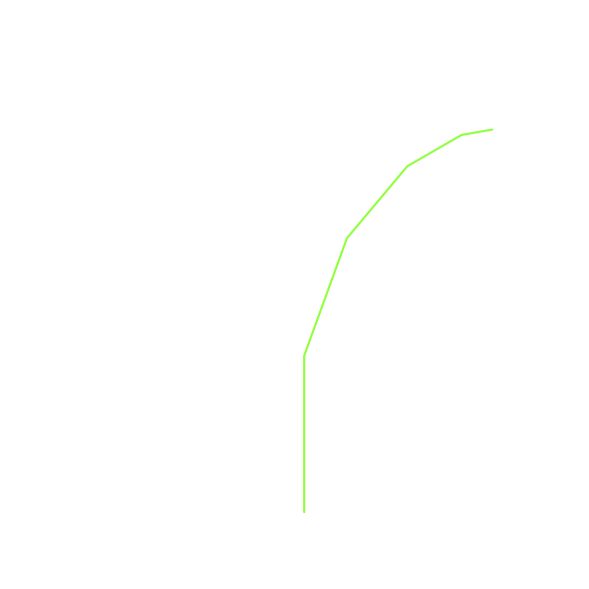
Now, notice how the program works its way back up the trunk until the entire right side of the tree is drawn. You can see the right half of the tree below:
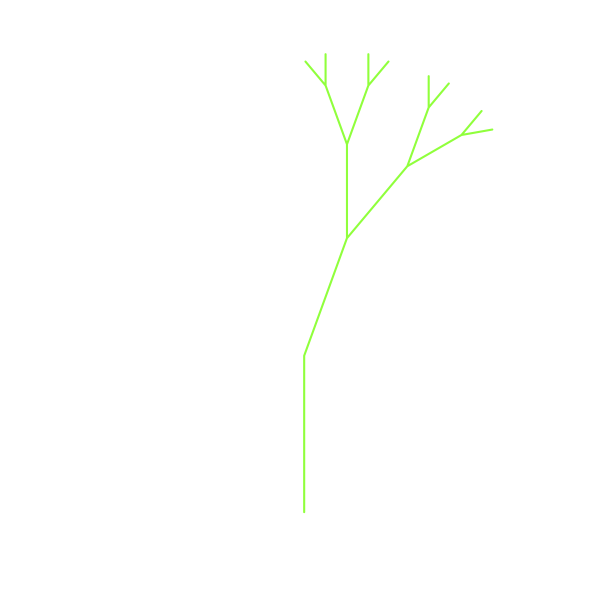
Then the left side of the tree is drawn, but not by going as far out to the left as possible. Rather, once again the entire right side of the left tree is drawn until we finally make our way out to the smallest twig on the left.
This simple tree program is just a starting point for you, and you will notice that the tree does not look particularly realistic because nature is just not as symmetrical as a computer program!
5.8 Sierpinski Triangle
The Sierpinski triangle illustrates a three-way recursive algorithm. The procedure for drawing a Sierpinski triangle by hand is simple.
- Start with a single large triangle.
- Divide this large triangle into four new triangles by connecting the midpoint of each side.
- Ignoring the middle triangle that you just created, apply the same procedure to each of the three corner triangles.
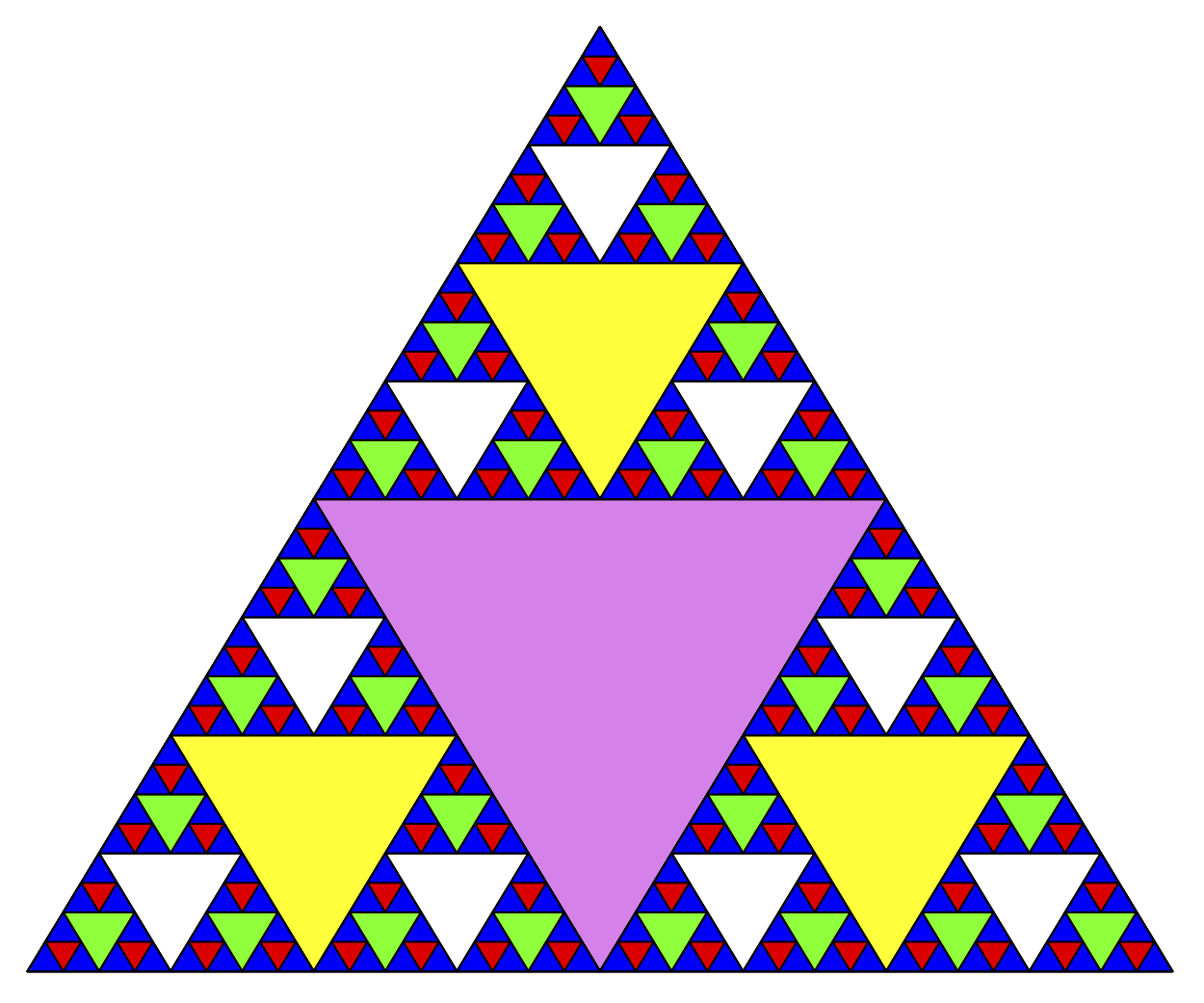
What is the base case? We will see that the base case is set arbitrarily as the number of times we want to divide the triangle into pieces. Sometimes we call this number the degree of the fractal. Each time we make a recursive call, we subtract 1 from the degree until we reach 0. When we reach a degree of 0, we stop making recursive calls.
(C++ CTurtle reference listing — part 1, not executed in the notebook.)
#include <CTurtle.hpp>
namespace ct = cturtle;

void drawTriangle(ct::Point a, ct::Point b, ct::Point c,
                  ct::Color color, ct::Turtle& turtle) {
    turtle.fillcolor(color);
    turtle.penup(); turtle.goTo(a); turtle.pendown();
    turtle.begin_fill();
    turtle.goTo(c); turtle.goTo(b); turtle.goTo(a);
    turtle.end_fill();
}
(part 2)
void sierpinski(ct::Point a, ct::Point b, ct::Point c,
                int degree, ct::Turtle& turtle) {
    const string colors[] = {
        "blue", "red", "green", "white", "yellow", "violet", "orange"
    };
    drawTriangle(a, b, c, {colors[degree]}, turtle);
    if (degree > 0) {
        sierpinski(a, ct::middle(a, b), ct::middle(a, c), degree - 1, turtle);
        sierpinski(b, ct::middle(a, b), ct::middle(b, c), degree - 1, turtle);
        sierpinski(c, ct::middle(c, b), ct::middle(a, c), degree - 1, turtle);
    }
}
There are three recursive calls, one for each of the new corner triangles we get when we connect the midpoints.
(part 3)
int main() {
    ct::TurtleScreen screen;
    screen.tracer(3);
    ct::Turtle turtle(screen);
    ct::Point points[] = {{-100, -50}, {0, 100}, {100, -50}};
    sierpinski(points[0], points[1], points[2], 3, turtle);
    screen.bye();
}
This is a desktop CTurtle example. It remains a non-executing listing in the notebook; the surrounding figures provide the visual trace.
Look at the code and think about the order in which the triangles will be drawn. Let's assume that the corners are ordered lower left, top, lower right. Because of the way the sierpinski function calls itself, sierpinski works its way to the smallest allowed triangle in the lower-left corner and then begins to fill out the rest of the triangles working back.
Then it fills in the triangles in the top corner by working toward the smallest, topmost triangle. Finally, it fills in the lower-right corner, working its way toward the smallest triangle in the lower right. Sometimes it is helpful to think of a recursive algorithm in terms of a diagram of function calls.
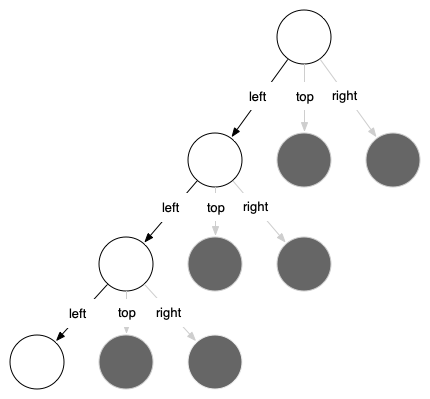
The active functions are outlined in black, and the inactive function calls are in gray. The farther you go toward the bottom, the smaller the triangles. The function finishes drawing one level at a time; once it is finished with the bottom left it moves to the bottom middle, and so on.
5.9 Complex Recursive Problems
Earlier problems were easy to solve recursively or helped build a mental model of recursion. Next we look at problems that are hard to solve iteratively but elegant with recursion, and finish with one whose elegant recursive solution turns out to be far too slow.
5.10 Tower of Hanoi
The Tower of Hanoi puzzle was invented by the French mathematician Edouard Lucas in 1883. He was inspired by a legend that tells of a Hindu temple where the puzzle was presented to young priests.
At the beginning of time, the priests were given three poles and a stack of 64 gold disks, each disk a little smaller than the one beneath it. Their assignment was to transfer all 64 disks from one of the three poles to another, with two important constraints.
- They could only move one disk at a time.
- They could never place a larger disk on top of a smaller one.
The priests worked very efficiently, day and night, moving one disk every second. When they finished their work, the legend said, the temple would crumble into dust and the world would vanish.
Although the legend is interesting, you need not worry about the world ending any time soon. The number of moves required to correctly move a tower of 64 disks is $2^{64}-1 = 18,446,744,073,709,551,615$. At a rate of one move per second, that is $584,942,417,355$ years!
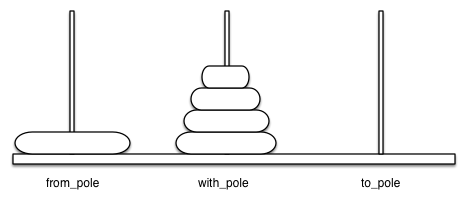
Figure below shows an example of a configuration of disks in the middle of a move from the first peg to the third. Notice that, as the rules specify, the disks on each peg are stacked so that smaller disks are always on top of the larger disks:
Let's think about this problem from the bottom up. Suppose you have a tower of five disks, originally on peg one. If you already knew how to move a tower of four disks to peg two, you could then easily move the bottom disk to peg three, and then move the tower of four from peg two to peg three.
But what if you do not know how to move a tower of height four? Suppose that you knew how to move a tower of height three to peg three; then it would be easy to move the fourth disk to peg two and move the three from peg three on top of it.
But what if you still do not know how to do this? Surely you would agree that moving a single disk to peg three is easy enough, trivial you might even say. This sounds like a base case in the making.
Here is a high-level outline of how to move a tower of height $h$ from the starting pole to the goal pole, using an intermediate pole:
- Move a tower of height $h-1$ from the starting pole to an intermediate pole via the goal pole.
- Move the remaining disk from the starting pole to the final pole.
- Move the tower of height $h-1$ from the intermediate pole to the goal pole via the starting pole.
The simplest non-empty Tower of Hanoi problem is a tower of one disk: we move that single disk to its destination. In the code, the base case is a tower of height 0, where there is nothing to move. In addition, the steps outlined above move us toward the base case by reducing the height of the tower in steps 1 and 3.
#include <iostream>
#include <string>
using namespace std;

void moveDisk(string fromP, string toP) {
    cout << "moving disk from " << fromP << " to " << toP << endl;
}
void moveTower(int height, string fromPole, string toPole, string withPole) {
    if (height >= 1) {
        moveTower(height - 1, fromPole, withPole, toPole);
        moveDisk(fromPole, toPole);
        moveTower(height - 1, withPole, toPole, fromPole);
    }
}

int main() { moveTower(3, "A", "B", "C"); }
moving disk from A to B
moving disk from A to C
moving disk from B to C
moving disk from A to B
moving disk from C to A
moving disk from C to B
moving disk from A to B
The base case is the tower of height 0; in this case there is nothing to do, so the moveTower() function returns. The important thing to remember about handling the base case this way is that simply returning from moveTower() is what finally allows the moveDisk() function to be called.
Now that you have seen the code for both moveTower() and moveDisk(), you may be wondering why we do not have a data structure that explicitly keeps track of what disks are on what poles.
If you explicitly tracked the disks, you could use three Stack objects, one per pole. The recursive C++ program instead relies on the runtime call stack to remember the suspended calls.
5.11 Exploring a Maze
In this section we will look at a problem that has relevance to the expanding world of robotics: how do you find your way out of a maze?
The problem we want to solve is to help our turtle find its way out of a virtual maze. The maze problem has roots as deep as the Greek myth about Theseus, who was sent into a maze to kill the Minotaur.
Theseus used a ball of thread to help him find his way back out again once he had finished off the beast. In our problem we will assume that our turtle is dropped down somewhere into the middle of the maze and must find its way out.
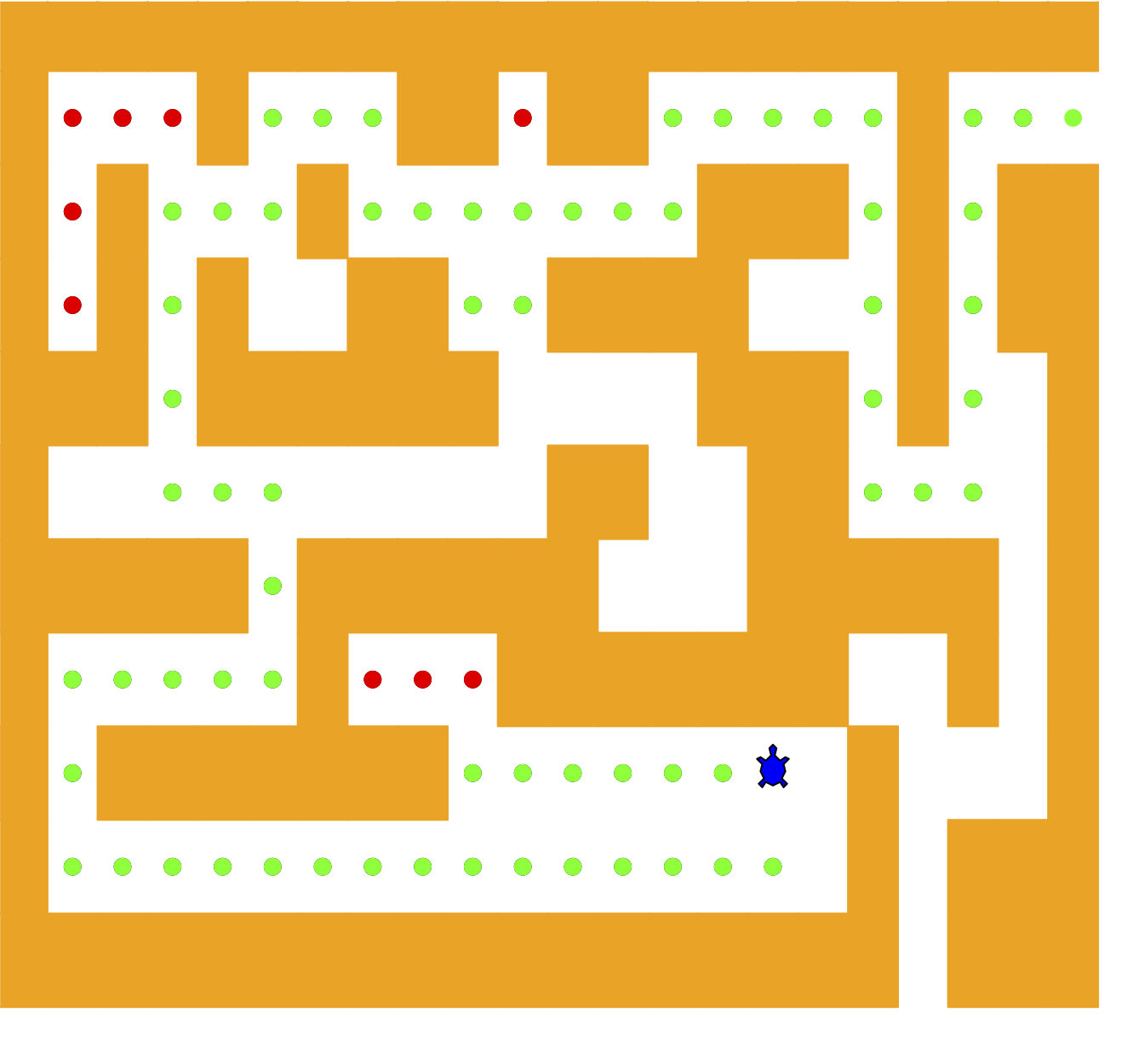
To make it easier for us we will assume that our maze is divided up into squares. Each square of the maze is either open or occupied by a section of wall. The turtle can only pass through the open squares of the maze. If the turtle bumps into a wall, it must try a different direction. Here is the procedure:
- From our starting position we will first try going north one square and then recursively try our procedure from there.
- If we are not successful by trying a northern path as the first step then we will take a step to the south and recursively repeat our procedure.
- If south does not work then we will try a step to the west as our first step and recursively apply our procedure.
- If north, south, and west have not been successful then we will apply the procedure recursively from a position one step to our east.
- If none of these directions works then there is no way to get out of the maze and we fail.
Now that sounds easy, but there are a couple of details to talk about! Suppose we take our first recursive step by going north. By following our procedure, our next step would also be to the north. But if the north is blocked by a wall, we must look at the next step of the procedure and try going to the south.
Unfortunately, that step to the south brings us right back to our original starting place. If we apply the recursive procedure from there, we will just go back one step to the North and be in an infinite loop! So we must have a strategy to remember where we have been!
In this case we will assume that we have a bag of bread crumbs we can drop along our way. If we take a step in a certain direction and find that there is a bread crumb already on that square, we know that we should immediately back up and try the next direction in our procedure. As we will see when we look at the code for this algorithm, backing up is as simple as returning from a recursive function call.
As we do for all recursive algorithms, let us review the base cases. Some of them you may already have guessed based on the description in the previous paragraph. In this algorithm, there are four base cases to consider:
The turtle has run into a wall. Since the square is occupied by a wall, no further exploration can take place.
The turtle has found a square that has already been explored. We do not want to continue exploring from this position so we don't get into a loop.
We have found an outside edge, not occupied by a wall. In other words, we have found an exit from the maze.
We have explored a square unsuccessfully in all four directions.
Now we will considering the following maze:
++++++++++++++++++++++
+   +   ++ ++     +
+ +   +       +++ + ++
+ + +  ++  ++++   + ++
+++ ++++++    +++ +  +
+          ++  ++    +
+++++ ++++++   +++++ +
+     +   +++++++  + +
+ +++++++      S +   +
+                + +++
++++++++++++++++++ +++
The Maze object will provide the following methods for us to use in writing our search algorithm:
Maze(filename)constructor Reads in a data file representing a maze, initializes the internal representation of the maze, and finds the starting grid position.print()Prints the current character-grid representation.
updatePosition()Updates the character stored at a grid position of the maze.isExit()Checks to see if the current position is an exit from the maze.
The Maze class also provides get(row, col) so that our algorithm can easily access the status of any particular square.
We represent the maze with a few named constants — the C++ version prints its progress as text instead of animating with turtle graphics:
const char START = 'S';
const char OBSTACLE = '+';
const char TRIED = '.';
const char DEAD_END = '-';
const char PART_OF_PATH = 'O';
The Maze(filename) constructor method takes the name of a file as its only parameter. This file is a text file that represents a maze by using "+" characters for walls, spaces for open squares, and the letter "S" to indicate the starting position.
class Maze {
    public:
        Maze(string mazeFilename) {
            ifstream mazeFile(mazeFilename);
            string line;
            while (getline(mazeFile, line)) {
                mazeList.push_back(line);
            }
            rowsInMaze = mazeList.size();
            columnsInMaze = mazeList[0].size();
            ...
            ...
            for (int row = 0; row < rowsInMaze; row++) {
                size_t col = mazeList[row].find(START);
                if (col != string::npos) {
                    startRow = row;
                    startCol = col;
                    break;
                }
            }
        }

        int startRow;
        int startCol;
    private:
        vector<string> mazeList;
        int rowsInMaze;
        int columnsInMaze;
};
The C++ Maze stores its character grid in a vector<string> named mazeList. Each string is one row, so mazeList[row][col] addresses one square.
The C++ version keeps the same recursive maze-search state transitions and prints the character grid. Each update is visible in the final grid without requiring a GUI turtle window:
void updatePosition(int row, int col, char val) {
    mazeList[row][col] = val;
}

void print() {
    for (string& row : mazeList) {
        cout << row << endl;
    }
}
The isExit() method uses the current current grid position to test for an exit condition. An exit condition occurs whenever the turtle has navigated to the edge of the maze, either row zero or column zero, or the far-right column or the bottom row.
bool isExit(int row, int col) {
    return (row == 0 || row == rowsInMaze - 1 ||
            col == 0 || col == columnsInMaze - 1);
}

char get(int row, int col) {
    return mazeList[row][col];
}
Let’s examine the code for the search function which we call searchFrom(). Notice that this function takes three parameters: a Maze object, the starting row, and the starting column. This is important because as a recursive function the search logically starts again with each recursive call.
bool searchFrom(Maze& maze, int row, int column) {
    // Base Case return values:
    //  1. We have run into an obstacle, return false
    if (maze.get(row, column) == OBSTACLE) {
        return false;
    }
    //  2. We have found an already explored square
    if (maze.get(row, column) == TRIED || maze.get(row, column) == DEAD_END) {
        return false;
    }
    //  3. We have found an exit
    if (maze.isExit(row, column)) {
        maze.updatePosition(row, column, PART_OF_PATH);
        return true;
    }
    maze.updatePosition(row, column, TRIED);
    ...
    ...
    // Otherwise, use logical short circuiting to try each direction
    bool found = searchFrom(maze, row - 1, column)
              || searchFrom(maze, row + 1, column)
              || searchFrom(maze, row, column - 1)
              || searchFrom(maze, row, column + 1);
    if (found) {
        maze.updatePosition(row, column, PART_OF_PATH);
    } else {
        maze.updatePosition(row, column, DEAD_END);
    }
    return found;
}
(complete listing: pythonds3/cppds/maze.hpp)
You will notice that in the recursive step there are four recursive calls to searchFrom(). It is hard to predict how many of these will be used since they are connected by || — if the first call succeeds, short-circuit evaluation skips the rest.
If the first call to searchFrom() returns true, short-circuit evaluation skips the other three calls. Geometrically, the north step is then on a path leading out of the maze.
If north fails, the next recursive call tries south, then west, then east. If all four calls return false, the current square is a dead end.
#include <iostream>
#include "pythonds3/cppds/maze.hpp"   // Maze class + searchFrom (md listing above)
using namespace std;

int main() {
    Maze myMaze("maze2.txt");
    searchFrom(myMaze, myMaze.startRow, myMaze.startCol);
    myMaze.print();   // O = path, . = tried, - = dead end
    return 0;
}
++++++++++++++++++++++
+-OO+OOO++ ++ +
OOOOOO+OOO ++++++++++
+-+-OO ++O ++++ +++ ++
+-+-OO+ +O++ OO +++ +
+---OO OO++OO++ + +
+++++-+ +-OOOOO++ + +
+++++-+++--+-+OO++ +
+----------+-+ O+ + +
+++++-+--+-+-+ + +
++++++++++++++++++++++
The maze file maze2.txt (already in the course folder):
++++++++++++++++++++++
+   +   ++ ++        +
      +     ++++++++++
+ +    ++  ++++ +++ ++
+ +   + + ++    +++  +
+          ++  ++  + +
+++++ + +      ++  + +
+++++ +++  + +  ++   +
+          + + S+ +  +
+++++ +  + + +     + +
++++++++++++++++++++++
In the printed C++ result, O marks the successful path, . marks tried squares, and - marks dead ends. This console representation preserves the backtracking algorithm without requiring a GUI turtle window.
5.12. Dynamic Programming (Optional)
Many programs in computer science are written to optimize some value; for example, find the shortest path between two points, find the line that best fits a set of points, or find the smallest set of objects that satisfies some criteria.
There are many strategies that computer scientists use to solve these problems. Dynamic programming is one strategy for these types of optimization problems.
A classic example of an optimization problem involves making change using the fewest coins. Suppose you are a programmer for a vending machine manufacturer. Your company wants to streamline effort by giving out the fewest possible coins in change for each transaction. Suppose a customer puts in a dollar bill and purchases an item for 37 cents. What is the smallest number of coins you can use to make change?
The answer is six coins: two quarters, one dime, and three pennies. How did we arrive at the answer of six coins? We start with the largest coin in our arsenal (a quarter) and use as many of those as possible, then we go to the next lowest coin value and use as many of those as possible. This first approach is called a greedy method because we try to solve as big a piece of the problem as possible right away.
The greedy method works fine when we are using U.S. coins, but suppose that your company decides to deploy its vending machines in other countries where, in addition to the usual 1, 5, 10, and 25 cent coins they also have a 21 cent coin. In this instance our greedy method fails to find the optimal solution for 63 cents in change. With the addition of the 21 cent coin the greedy method would still find the solution to be six coins. However, the optimal answer is three 21 cent pieces!
Let's start with identifying the base case and use recursion instead. If we are trying to make change for the same amount as the value of one of our coins, the answer is easy, one coin.
If the amount does not match we have several options. What we want is the minimum of a penny plus the number of coins needed to make change for the original amount minus a penny, or a nickel plus the number of coins needed to make change for the original amount minus five cents, and so on. So the number of coins needed to make change for the original amount is:
$$\begin{split} num\_coins = min \begin{cases} 1 + num\_coins(original\ amount - 1) \\ 1 + num\_coins(original\ amount - 5) \\ 1 + num\_coins(original\ amount - 10) \\ 1 + num\_coins(original\ amount - 25) \end{cases} \label{eqn_change}\end{split}$$
#include <iostream>
#include <vector>
#include <algorithm>
#include <climits>
using namespace std;

int makeChange1(vector<int> coinDenoms, int change) {
    if (find(coinDenoms.begin(), coinDenoms.end(), change) != coinDenoms.end()) {
        return 1;
    }
    int minCoins = INT_MAX;
    for (int i : coinDenoms) {
        if (i <= change) {
            int numCoins = 1 + makeChange1(coinDenoms, change - i);
            minCoins = min(numCoins, minCoins);
        }
    }
    return minCoins;
}

int main() {
    // 26 cents makes 377 total calls; 63 cents makes 67,716,925.
    cout << makeChange1({1, 5, 10, 25}, 26) << endl;
    return 0;
}
2
In line 3 we are checking our base case; that is, we are trying to make change in the exact amount of one of our coins. If we do not have a coin equal to the amount of change, we make recursive calls for each different coin value less than the amount of change we are trying to make.
The trouble with the algorithm is that it is extremely inefficient. In fact, it takes $67,716,925$ recursive calls to find the optimal solution to the 4 coins, 63 cents problem! The following figure illustrates a small fraction of the 377 function calls needed to find the optimal set of coins to make change for 26 cents.
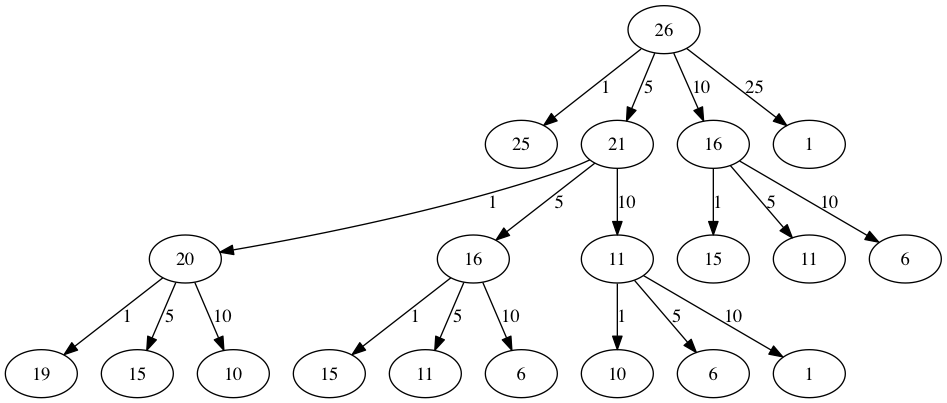
Each node in the graph corresponds to a call to makeChange1(). The label on the node indicates the amount of change for which we are computing the number of coins. The label on the arrow indicates the coin that we just used.
The main problem is that we are redoing too many calculations. For example, the graph shows that the algorithm would recalculate the optimal number of coins to make change for 15 cents at least three times. Each of these computations to find the optimal number of coins for 15 cents itself takes 52 function calls. Clearly we are wasting a lot of time and effort recalculating old results.
The key to cutting down on the amount of work we do is to remember some of the past results so we can avoid recomputing results we already know.
A simple solution is to store the results for the minimum number of coins in a table when we find them. Then before we compute a new minimum, we first check the table to see if a result is already known. If there is already a result in the table, we use the value from the table rather than recomputing!
#include <iostream>
#include <vector>
using namespace std;

int makeChange2(const vector<int>& coins, int change,
                vector<int>& knownResults) {
    int minCoins = change;
    for (int coin : coins) {
        if (coin == change) {
            knownResults[change] = 1;
            return 1;
        } else if (knownResults[change] > 0) {
            return knownResults[change];
        }
    }
    for (int coin : coins) {
        if (coin <= change) {
            int candidate = 1 + makeChange2(
                coins, change - coin, knownResults);
            if (candidate < minCoins) {
                minCoins = candidate;
                knownResults[change] = minCoins;
            }
        }
    }
    return minCoins;
}

int main() {
    vector<int> knownResults(64, 0);
    cout << makeChange2({1, 5, 10, 25}, 63, knownResults) << endl;
}
6
For the exact cppds listing above, table lookup reduces the four-coin, 63-cent computation to 221 total calls. The count depends on where the cache checks and assignments occur, so a differently organized but equivalent memoized function can have a different call count.
It looks and feels like a bit of a hack. Also, if we look at the knownResults vector we can see that there are some holes in the table. In fact the term for what we have done is not dynamic programming but rather we have improved the performance of our program by using a technique known as memoization, or more commonly called caching.
A truly dynamic programming algorithm will take a more systematic approach to the problem. Our dynamic programming solution is going to start with making change for one cent and systematically work its way up to the amount of change we require.
This guarantees that at each step of the algorithm we already know the minimum number of coins needed to make change for any smaller amount.
Let’s look at how we would fill in a table of minimum coins to use in making change for 11 cents:
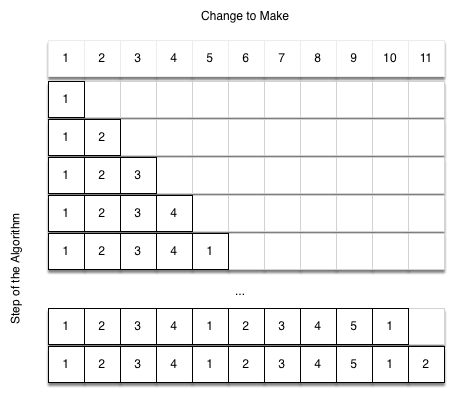
We start with one cent. The only solution possible is one coin. The next row shows the minimum for one cent and two cents. Again, the only solution is two pennies. The fifth row is where things get interesting. Now we have two options to consider, five pennies or one nickel.
How do we decide which is best? We consult the table and see that the number of coins needed to make change for four cents is four, plus one more penny to make five, equals five coins. Or we can look at zero cents plus one more nickel to make five cents equals one coin. Since the minimum of one and five is one we store 1 in the table. Fast forward again to the end of the table and consider 11 cents.
Figure below shows the three options that we have to consider:
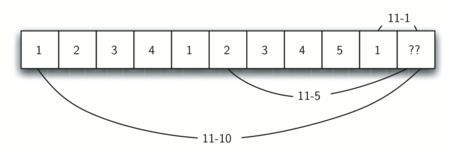
A penny plus the minimum number of coins to make change for 11-1=10 cents (1)
A nickel plus the minimum number of coins to make change for 11-5=6 cents (2)
A dime plus the minimum number of coins to make change for 11-10=1 cent (1)
makeChange3() is the bottom-up dynamic-programming version. It takes a vector of valid coin values, the target amount, and a vector that stores the minimum coin count for every amount from 0 through the target.
#include <iostream>
#include <vector>
using namespace std;

int makeChange3(vector<int>& coinValueList, int change, vector<int>& minCoins) {
    for (int cents = 0; cents <= change; cents++) {
        int coinCount = cents;
        for (int j : coinValueList) {
            if (j <= cents && minCoins[cents - j] + 1 < coinCount) {
                coinCount = minCoins[cents - j] + 1;
            }
        }
        minCoins[cents] = coinCount;
    }
    return minCoins[change];
}

int main() {
    vector<int> coins = {1, 5, 10, 25};
    vector<int> minCoins(64, 0);
    cout << makeChange3(coins, 63, minCoins) << endl;
    return 0;
}
6
makeChange3() is not recursive. For each amount from 0 through change, its inner loop checks every denomination and stores the best result already computed for a smaller amount. With A as the target and C coin types, the work is $O(AC)$ and the table uses $O(A)$ space.
We can easily extend makeChange3 to keep track of the coins used by simply remembering the last coin we add for each entry in the minCoins table. If we know the last coin added, we can simply subtract the value of the coin to find a previous entry in the table that tells us the last coin we added to make that amount. We can keep tracing back through the table until we get to the beginning!
int makeChange4(vector<int>& coinValueList, int change,
                vector<int>& minCoins, vector<int>& coinsUsed) {
    for (int cents = 0; cents <= change; cents++) {
        int coinCount = cents;
        int newCoin = 1;
        for (int j : coinValueList) {
            if (j <= cents && minCoins[cents - j] + 1 < coinCount) {
                coinCount = minCoins[cents - j] + 1;
                newCoin = j;
            }
        }
        minCoins[cents] = coinCount;
        coinsUsed[cents] = newCoin;
    }
    return minCoins[change];
}

void printCoins(vector<int>& coinsUsed, int change) {
    int coin = change;
    while (coin > 0) {
        int thisCoin = coinsUsed[coin];
        cout << thisCoin << " ";
        coin = coin - thisCoin;
    }
    cout << endl;
}
#include <iostream>
#include <vector>
using namespace std;

int makeChange4(vector<int>& coinValueList, int change,
                vector<int>& minCoins, vector<int>& coinsUsed) {
    for (int cents = 0; cents <= change; cents++) {
        int coinCount = cents;
        int newCoin = 1;
        for (int j : coinValueList) {
            if (j <= cents && minCoins[cents - j] + 1 < coinCount) {
                coinCount = minCoins[cents - j] + 1;
                newCoin = j;
            }
        }
        minCoins[cents] = coinCount;
        coinsUsed[cents] = newCoin;
    }
    return minCoins[change];
}

void printCoins(vector<int>& coinsUsed, int change) {
    int coin = change;
    while (coin > 0) {
        int thisCoin = coinsUsed[coin];
        cout << thisCoin << " ";
        coin = coin - thisCoin;
    }
    cout << endl;
}

int main() {
    int amnt = 63;
    vector<int> clist = {1, 5, 10, 21, 25};
    vector<int> coinsUsed(amnt + 1, 0);
    vector<int> coinCount(amnt + 1, 0);

    cout << "Making change for " << amnt << " requires the following "
         << makeChange4(clist, amnt, coinCount, coinsUsed) << " coins: ";
    printCoins(coinsUsed, amnt);
    cout << "The used list is as follows:" << endl;
    for (int c : coinsUsed) cout << c << " ";
    cout << endl;
    return 0;
}
Making change for 63 requires the following 3 coins: 21 21 21
The used list is as follows:
1 1 1 1 1 5 1 1 1 1 10 1 1 1 1 5 1 1 1 1 10 21 1 1 1 25 1 1 1 1 5 10 1 1 1 10 1 1 1 1 5 10 21 1 1 10 21 1 1 1 25 1 10 1 1 5 10 1 1 1 10 1 10 21
coinsUsed records the last coin chosen for each amount, while coinCount records the minimum number of coins for each amount. Both are C++ vectors indexed by the amount.
Notice that the coins we print out come directly from the coinsUsed array. For the first call we start at array position 63 and print 21. Then we take and look at the 42nd element of the list. Once again we find a 21 stored there. Finally, element 21 of the array also contains 21, giving us the three 21 cent pieces.
References
- Textbook: Problem Solving with Algorithms and Data Structures using C++ (cppds), Chapter 5 (Recursion) — https://runestone.academy/ns/books/published/cppds/index.html
Key terms
Here's a brief definition for each of the key terms:
Recursion: A programming technique where a function calls itself directly or indirectly to solve a problem. It breaks down a problem into smaller, more manageable parts until reaching a base case that can be solved directly.
Base Case: The condition that stops recursion and covers every smallest valid input; for example,
size() <= 1safely handles both empty and one-character strings.Stack Frame: A portion of stack memory that contains all information necessary to execute a function call, including parameters, return addresses, and local variables. Each recursive call creates a new stack frame on the call stack.
Fractals: Geometric figures that are self-similar across different scales. These complex patterns are created by repeating a simple process in an ongoing feedback loop and are often used to generate natural-looking scenarios in computer graphics.
Dynamic Programming: A method for solving complex problems by breaking them down into simpler, overlapping subproblems. Each subproblem is solved once and its solution is stored to avoid redundant calculations.
Greedy Method: A problem-solving strategy that makes the locally optimal choice at each step with the hope of finding a global optimum. While simple to implement, it does not guarantee an optimal solution for all problems.
Memoization: Top-down caching that stores solved subproblems for reuse. Bottom-up dynamic programming instead fills a table in dependency order.