Introduction
Introduction
Why Study Data Structures and Abstract Data Types?
Getting Started with Data
Review of Programming
Review of OOP
1.1~1.4 Introduction
Given a problem, a computer scientist's goal is to develop an algorithm, a step-by-step list of instructions for solving any instance of the problem that might arise. Algorithms are finite processes that if followed will solve the problem.

It is very common to include the word computable when describing problems and solutions. We say that a problem is computable if an algorithm exists for solving it. A definition for computer science is to study the problems that are and that are not computable!
Computer science is also the study of abstraction. Abstraction allows us to view the problem and solution in such a way as to separate the so-called logical and physical perspectives.
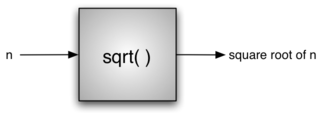
For instance, you are using the functions provided by the vehicle designers for the purpose of transporting you from one location to another. These functions are sometimes also referred to as the interface.
As another example of abstraction, consider the C++ cmath library. Once we include the header, we can perform computations such as
#include <iostream>
#include <cmath>
using namespace std;

int main() {
    cout << sqrt(16) << endl;
    return 0;
}
4
This is an example of procedural abstraction.
Programming is the process of encoding an algorithm into a programming language, so that it can be executed by a computer. Programming languages must provide ways to represent both the process and the data which is known as control constructs and data types.
Control constructs allow algorithmic steps to be represented in a convenient yet unambiguous way.
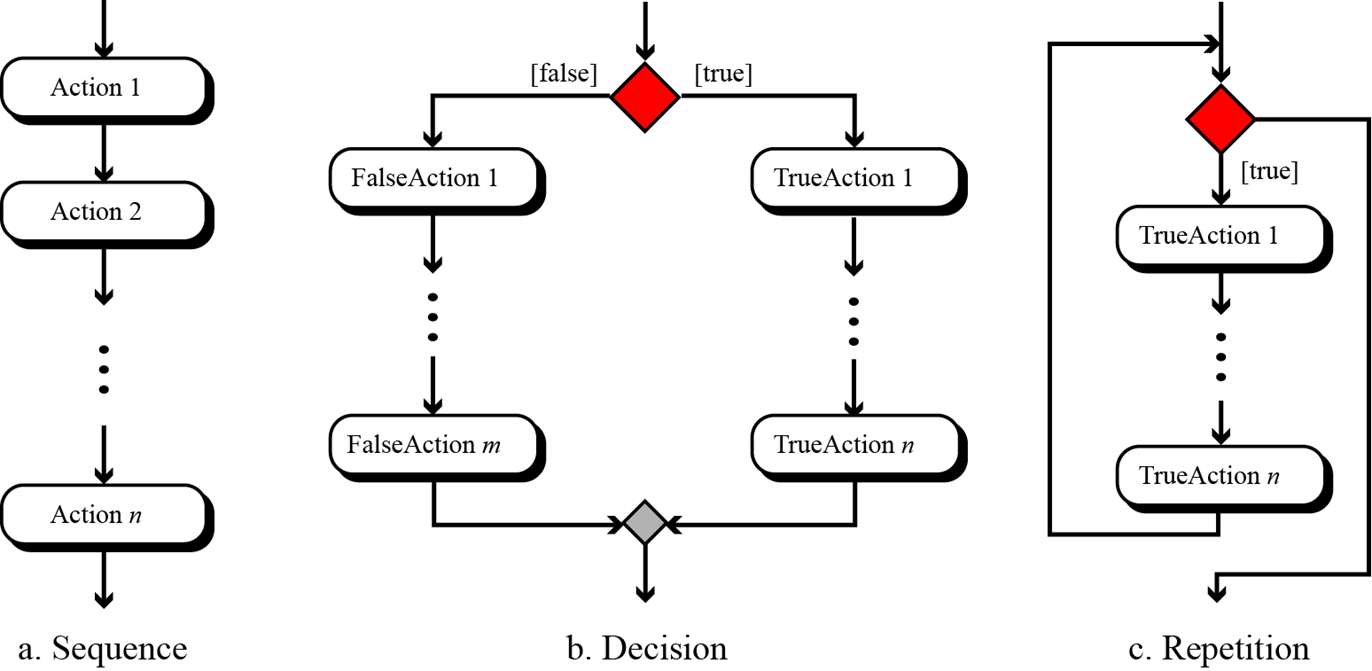
We give the formal definition of algorithm here:
Well-Defined: An algorithm must be a well-defined, ordered set of instructions.
Unambiguous steps: If one step is to add two integers, we must define both 'integers' as well as the ‘add’ operation
Produce a result: An algorithm must produce a result. The result can be data returned or some other effect (for example, printing).
Terminate in a finite time: An algorithm must terminate. If it does not, we have not created an algorithm!
1.5 Why Study Data Structures and Abstract Data Types?
The data abstraction share a similar idea with procedure abstraction. An abstract data type, sometimes abbreviated ADT, is a logical description of how we view the data and the operations that are allowed without regard to how they will be implemented.
By providing this level of abstraction, we are creating an encapsulation around the data. The idea is that by encapsulating the details of the implementation, we are hiding them from the user's view.
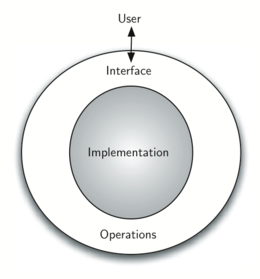
The implementation of an abstract data type, often referred to as a data structure, will require that we provide a physical view of the data using some collection of programming constructs and primitive data types.
The separation of these two perspectives will allow us to provide an implementation-independent view of the data.
There will usually be many different ways to implement an abstract data type and the user can remain focused on the problem-solving process.
1.6 Why Study Algorithms?
Being exposed to different problem-solving techniques and seeing how different algorithms are designed to help us. We can then begin to develop pattern recognition so that the next time a similar problem arises, we are better able to solve it!
On the other hand, it is entirely possible that there are many different ways to implement the details to algorithm. One algorithm may use many fewer resources than another. We would like to have some way to compare these solutions. Even though they both work, one is perhaps "better" than the other.
As we study algorithms, we can learn analysis techniques that allow us to compare and contrast solutions based solely on their own characteristics, not the characteristics of the program or computer used to implement them.
There will often be trade-offs that we will need to identify and decide upon. As computer scientists, in addition to our ability to solve problems, we will also need to know and understand solution evaluation techniques.
1.8 Getting Started with Data
In C++, as well as in any other object-oriented programming language, we define a class to be a description of what the data look like (the state) and what the data can do (the behavior).
Classes are analogous to abstract data types because a user of a class only sees the state and behavior of an objects in the object-oriented paradigm. An object is an instance of a class.
1.8.1 Built-in Atomic Data Types
C++ requires users to specify the data type of each variable before use. The primary built-in numeric types are int (integer) and float/double (floating point, with double having twice the precision). The standard arithmetic operators, +, -, *, /, and % (modulo), can be used. Exponentiation is done with the pow() function from <cmath>, and integer division is simply / applied to two integers:
using namespace std;
cout << 2 + 3 * 4 << endl;
cout << (2 + 3) * 4 << endl;
cout << pow(2, 10) << endl;
cout << 6 / 3 << endl;
cout << 7 / 3 << endl;   // integer division truncates!
cout << 7.0 / 3 << endl; // one double operand -> floating-point division
cout << 7 % 3 << endl;
cout << pow(2, 100) << endl; // a double approximation, not an exact integer
14
20
1024
2
2
2.33333
1
1.26765e+30
The Boolean data type, implemented as the C++ bool type, will be quite useful for representing truth values. The possible state values for a Boolean object are true and false with the standard Boolean operators, && (and), || (or), and ! (not).
using namespace std;
cout << (false || true) << endl;
cout << !(false || true) << endl;
cout << (true && true) << endl;

// by default C++ prints bools as 1 / 0; boolalpha prints true / false
cout << boolalpha << (false || true) << endl;
1
0
1
true
Boolean data objects are also used as results for comparison operators such as equality (==) and greater than (>). The table below shows the relational and logical operators.
| Operation Name | Operator | Explanation |
|---|---|---|
| less than | < | Less than operator |
| greater than | > | Greater than operator |
| less than or equal | <= | Less than or equal to operator |
| greater than or equal | >= | Greater than or equal to operator |
| equal | == | Equality operator |
| not equal | != | Not equal operator |
| logical and | && | Both operands must be true for the result to be true |
| logical or | || | One or the other operand must be true |
| logical not | ! | Negates the truth value |
using namespace std;
cout << boolalpha;
cout << (5 == 10) << endl;
cout << (10 > 5) << endl;
cout << ((5 >= 1) && (5 <= 10)) << endl;
cout << ((1 < 5) || (10 < 1)) << endl;

// Careful: chained comparison does NOT work like Python!
cout << (10 < 5 < 3) << endl;  // (10 < 5) evaluates to 0, then 0 < 3 is true!
false
true
true
true
true
Identifiers are used in programming languages as names. In C++, identifiers start with a letter or an underscore (_), are case sensitive, can be of any length, and cannot be one of the reserved keywords (such as int, class, or while).
A C++ variable must be declared with a type before it is used. A declaration such as int the_sum = 0; reserves a piece of memory of the right size and stores the value itself in it — not a reference to an object as Python does. Assignment statements then change the value stored in that memory.
using namespace std;
int the_sum = 0;
cout << the_sum << endl;

the_sum = the_sum + 1;
cout << the_sum << endl;

the_sum = 3.5;  // legal, but the bool is converted to the int 1
cout << the_sum << endl;
0
1
3
The declaration int the_sum = 0; creates a variable — a named box of memory of type int — and stores the value 0 inside the box. Later assignments replace the contents of the same box.
The type of the variable is fixed at declaration: the_sum is an integer for its entire lifetime, no matter what we assign to it.
If we assign data of a different type, as shown above with the Boolean value true, the value is implicitly converted to the variable's declared type (true becomes the int 1). The variable itself never changes type.
This is a static characteristic of C++: the compiler knows the type of every variable up front and can catch type errors before the program ever runs. This is a fundamental difference from Python, where the same name can refer to objects of many different types.
Python variables secretly are references: every name stores the address of an object. C++ gives you both worlds explicitly — ordinary variables store values directly, and a pointer is a variable that stores the memory address of another variable.
The address-of operator & gives the address of a variable, and a pointer is declared by putting * in front of its name. Applying * to a pointer (the dereference operator) accesses the value stored at that address.
using namespace std;
int var_n = 100;
int *ptr_n = &var_n;   // ptr_n holds the address of var_n

cout << "value of var_n:   " << var_n << endl;
cout << "address of var_n: " << &var_n << endl;
cout << "ptr_n stores:     " << ptr_n << endl;
cout << "*ptr_n gives:     " << *ptr_n << endl;
value of var_n:   100
address of var_n: 0x89e81ffd74
ptr_n stores:     0x89e81ffd74
*ptr_n gives:     100
If we change var_n through the pointer, the original variable changes too — both names look at the same memory:
using namespace std;
int var_n = 100;
int *ptr_n = &var_n;

*ptr_n = 50;
cout << var_n << endl;   // var_n is now 50
50
A pointer that does not point anywhere yet should be set to NULL (or nullptr in modern C++). Dereferencing a NULL or uninitialized pointer is a serious runtime error — this is the C++ counterpart of Python's AttributeError: 'NoneType'. Pointers are the foundation we will use to build linked data structures later in this course.
1.9. Built-in Collection Data Types
C++ has a number of very powerful collection classes. arrays, vectors, and strings are ordered collections (sequence) that are very similar in general structure. Sets and hash tables (unordered_set,unordered_map) are unordered collections.
A vector is an ordered collection of zero or more C++ data objects of the same type. Unlike Python lists, vectors are homogeneous — but they can grow dynamically, which makes them the closest C++ counterpart of a Python list. Vectors live in the <vector> header:
using namespace std;

vector<double> my_list = {1, 3, 6.5};

for (double item : my_list) {
    cout << item << " ";
}
cout << endl;
1 3 6.5
Since vectors are considered to be sequentially ordered, they support a number of operations that can be applied to any C++ sequence.
| Operation Name | Operator / Method | Explanation |
|---|---|---|
| indexing | [ ] |
Access an element of a sequence (no bounds check) |
| checked access | .at(i) |
Access an element, throws if out of range |
| length | .size() |
Ask the number of items in the sequence |
| first / last | .front() / .back() |
Access the first / last element |
| membership | find(...) |
Locate an item via the <algorithm> header |
Note that the indices for vectors start counting with 0. There is no built-in slice operator, but the same effect can be achieved with iterator ranges, e.g. vector<double>(v.begin() + 1, v.begin() + 3) copies items 1 up to—but not including—index 3.
Vectors support a number of methods that will be used to build data structures.
| Method Name | Use | Explanation |
|---|---|---|
| push_back | a_vec.push_back(item) |
Adds a new item to the end of a vector |
| insert | a_vec.insert(a_vec.begin() + i, item) |
Inserts an item at the ith position |
| pop_back | a_vec.pop_back() |
Removes the last item (returns nothing!) |
| erase | a_vec.erase(a_vec.begin() + i) |
Removes the ith item |
| sort | sort(a_vec.begin(), a_vec.end()) |
Sorts the vector (from <algorithm>) |
| reverse | reverse(a_vec.begin(), a_vec.end()) |
Reverses the order (from <algorithm>) |
| count | count(a_vec.begin(), a_vec.end(), item) |
Counts occurrences (from <algorithm>) |
| clear | a_vec.clear() |
Removes all items |
using namespace std;
vector<double> my_list = {1024, 3, 1, 6.5};

my_list.push_back(0);                      // append at the end
for (double x : my_list) cout << x << " ";
cout << endl;

my_list.insert(my_list.begin() + 2, 4.5);  // insert at index 2
for (double x : my_list) cout << x << " ";
cout << endl;

my_list.pop_back();                        // remove last item
my_list.erase(my_list.begin() + 1);        // remove item at index 1
for (double x : my_list) cout << x << " ";
cout << endl;
1024 3 1 6.5 0
1024 3 4.5 1 6.5 0
1024 4.5 1 6.5
using namespace std;
vector<double> my_list = {1024, 4.5, 6.5, 1};

sort(my_list.begin(), my_list.end());
for (double x : my_list) cout << x << " ";
cout << endl;

reverse(my_list.begin(), my_list.end());
for (double x : my_list) cout << x << " ";
cout << endl;

cout << count(my_list.begin(), my_list.end(), 6.5) << endl;

my_list.erase(find(my_list.begin(), my_list.end(), 6.5));  // remove by value
for (double x : my_list) cout << x << " ";
cout << endl;
1 4.5 6.5 1024
1024 6.5 4.5 1
1
1024 4.5 1
You can see that some of the methods, such as erase(), modify the vector. Note a difference from Python: pop_back() removes the last item but returns nothing — if you want the value, read .back() first. You should also notice the familiar "dot" notation for asking an object to invoke a method.
In C++, operators themselves are functions in disguise: for user-defined types we can overload operators such as + and ==, as we will see when we build our own classes in Section 1.11.
Python's range() has no direct C++ counterpart. Instead, the classic counting for loop plays the same role — and gives even finer control over start, stop, and step:
using namespace std;
for (int i = 0; i < 10; i++) cout << i << " ";      // like range(10)
cout << endl;

for (int i = 5; i < 10; i++) cout << i << " ";      // like range(5, 10)
cout << endl;

for (int i = 5; i < 10; i += 2) cout << i << " ";   // like range(5, 10, 2)
cout << endl;

for (int i = 10; i > 1; i--) cout << i << " ";      // like range(10, 1, -1)
cout << endl;
0 1 2 3 4 5 6 7 8 9
5 6 7 8 9
5 7 9
10 9 8 7 6 5 4 3 2
Strings are sequential collections of zero or more letters, numbers, and other symbols. In C++, double quotes create a string literal while single quotes create a single char — they are not interchangeable as in Python:
using namespace std;
string my_name = "David";
char initial = 'D';   // single quotes: one character

cout << my_name << endl;
cout << my_name[3] << endl;
cout << my_name + my_name << endl;  // concatenation
cout << my_name.length() << endl;
David
i
DavidDavid
5
A major difference from Python: C++ strings are mutable! In Python, strings cannot be changed in place, but in C++ both vectors and strings can be modified through indexing.
using namespace std;
vector<int> my_list = {1, 3, 6};
my_list[0] = 1024;      // legal
for (int x : my_list) cout << x << " ";
cout << endl;

string my_name = "David";
my_name[0] = 'X';      // also legal in C++ (illegal in Python!)
cout << my_name << endl;
1024 3 6
Xavid
What about Python's fixed-size sequence, the tuple? The closest C++ relative is the built-in array — a fixed-size, homogeneous sequence inherited from the C language. Its size is set once and can never change, and it performs no bounds checking:
using namespace std;
int my_arr[] = {2, 1, 4};      // size fixed at 3 forever

cout << my_arr[0] << endl;
my_arr[1] = 99;                // elements ARE mutable
cout << my_arr[1] << endl;

// DANGER: no bounds checking — this compiles and silently reads garbage!
cout << my_arr[3] << endl;
2
99
-2095055888
Our final C++ collection is an unordered structure called a hash table, provided as std::unordered_map (and its sorted sibling std::map). They are collections of associated pairs of items where each pair consists of a key and a value, written as {key, value} — the direct counterpart of Python's dictionary.
#include <iostream>
#include <map>
using namespace std;

int main() {
    map<string, string> capitals = {{"Iowa", "Des Moines"}, {"Wisconsin", "Madison"}};
    for (auto& pair : capitals) {
        cout << pair.first << ": " << pair.second << endl;
    }
    return 0;
}
Iowa: Des Moines
Wisconsin: Madison
We can manipulate a hash table by accessing a value via its key or by adding another key-value pair. The syntax for access looks much like a sequence access except that instead of using the index of the item, we use the key value.
#include <iostream>
#include <map>
using namespace std;
int main() {
    map<string, string> capitals = {{"Iowa", "Des Moines"}, {"Wisconsin", "Madison"}};
    cout << capitals["Iowa"] << endl;

    capitals["Utah"] = "Salt Lake City";       // add a new pair
    capitals["California"] = "Sacramento";
    cout << capitals.size() << endl;

    for (auto& pair : capitals) {
        cout << pair.second << " is the capital of " << pair.first << endl;
    }
    return 0;
}
Des Moines
4
Sacramento is the capital of California
Des Moines is the capital of Iowa
Salt Lake City is the capital of Utah
Madison is the capital of Wisconsin
Hash tables have both methods and operators. Iterating over the map visits key-value pairs whose members are reached with .first (the key) and .second (the value).
| Operator / Method | Use | Explanation |
|---|---|---|
[] |
a_map[k] |
Returns the value associated with k; inserts a default value if k is absent! |
at |
a_map.at(k) |
Returns the value associated with k, otherwise throws an exception |
count |
a_map.count(k) |
Returns 1 if key is in the map, 0 otherwise |
erase |
a_map.erase(k) |
Removes the entry from the map |
| Method Name | Use | Explanation |
|---|---|---|
size |
a_map.size() |
Returns the number of key-value pairs |
find |
a_map.find(k) |
Returns an iterator to the pair with key k, or end() if absent |
begin/end |
a_map.begin() |
Iterators over all pairs — use .first / .second on each |
clear |
a_map.clear() |
Removes all entries |
#include <iostream>
#include <map>
using namespace std;

int main() {
    map<string, int> phone_ext = {{"david", 1410}, {"brad", 1137}, {"roman", 1171}};

    for (auto& p : phone_ext) cout << p.first << " ";   // the keys
    cout << endl;
    for (auto& p : phone_ext) cout << p.second << " ";  // the values
    cout << endl;

    cout << phone_ext.count("kent") << endl;            // 0: not present
    if (phone_ext.find("kent") == phone_ext.end()) {
        cout << "NO ENTRY" << endl;   // the C++ way to supply a default
    }
    return 0;
}
brad david roman
1137 1410 1171
0
NO ENTRY
Input and Output
C++ provides stream objects for input and output: cout writes to standard output and cin reads from standard input. Both live in the <iostream> header.
cin extracts whitespace-separated tokens from the input, and the declared type of the target variable controls how the text is converted. There is no separate prompt parameter as in Python's input() — you print the prompt yourself with cout first:
using namespace std;
string a_name;
cout << "Please enter your name: ";
cin >> a_name;
cout << "Your name is " << a_name << " and has length " << a_name.length() << endl;
// cout << boolalpha
//      << is_same_v<decltype(a_name), string>
//      << endl;
Please enter your name: phonchi
Your name is phonchi and has length 7
It is important to note that cin >> radius parses the entered characters according to the variable's type — reading into a double converts the text to a number directly, so no explicit conversion like Python's float() is needed. (If the text is not a valid number, cin enters a fail state instead of throwing an error.)
using namespace std;
double radius;
cout << "Please enter the radius of the circle ";
cin >> radius;

double diameter = 2 * radius;
cout << diameter << endl;
// cout << boolalpha
//      << is_same_v<decltype(radius), double>
//      << endl;
Please enter the radius of the circle 3.6
7.2
Output Formatting
cout prints exactly what you give it: there is no automatic separator or newline as with Python's print(). You insert separators and line breaks yourself, chaining values with <<:
using namespace std;
cout << "Hello" << endl;
cout << "Hello" << " " << "World" << endl;
cout << "Hello" << "***" << "World" << endl;
cout << "Hello" << "***";   // no newline
cout << "Hello" << endl;
Hello
Hello World
Hello***World
Hello***Hello
It is often useful to have more control over the look of your output. Fortunately, C++ provides us with stream manipulators in the <iomanip> header: helpers inserted into the stream that control how the following values are formatted.
using namespace std;
string a_name = "David";
int age = 20;
cout << a_name << " is " << age << " years old." << endl;
David is 20 years old.
A manipulator is inserted with << just like a value. Some, such as setw(), affect only the next value; others, such as fixed and setprecision(), stay in effect until changed.
The table below shows the most useful manipulators. setw() plays the role of Python's field-width modifier, and fixed + setprecision() play the role of %.2f.
| Manipulator | Output Effect |
|---|---|
endl |
Ends the line and flushes the stream |
setw(n) |
Prints the next value in a field of width n |
fixed |
Uses fixed-point notation for floating-point values |
setprecision(n) |
With fixed: prints n digits after the decimal point |
left / right |
Left- or right-justifies values inside their field |
setfill(c) |
Pads fields with character c instead of spaces |
boolalpha |
Prints bools as true / false instead of 1 / 0 |
Putting it all together: justification and padding manipulators give the same control as Python's f-string alignment symbols — left replaces <, right replaces >, and setfill() replaces the padding character.
| Manipulator | Example | Description |
|---|---|---|
| (default right) | setw(10) << x |
Right-aligned in a field of width 10 |
left |
left << setw(10) << x |
Left-aligned in a field of width 10 |
setfill('0') |
setfill('0') << setw(10) << x |
Field padded with 0 instead of spaces |
setfill('.') |
setfill('.') << setw(10) << x |
Field padded with dots |
using namespace std;
int price = 24;
string item = "banana";

cout << "The " << setw(10) << item << " costs "
     << setw(10) << fixed << setprecision(2) << double(price) << " cents" << endl;
cout << "The " << left << setw(10) << item << " costs "
     << setw(10) << double(price) << " cents" << right << endl;
cout << "The " << setw(10) << item << " costs "
     << setfill('0') << setw(10) << double(price) << " cents" << setfill(' ') << endl;

cout << "Item:" << setfill('.') << setw(10) << item << endl;
cout << "Price:" << setw(4) << "$"
     << setfill(' ') << setw(5) << double(price) << endl;
The     banana costs      24.00 cents
The banana     costs 24.00      cents
The     banana costs 0000024.00 cents
Item:....banana
Price:...$24.00
Control Structures
As we noted earlier, algorithms require two important control structures: iteration and selection. Both of these are supported by C++ in various forms. For iteration, C++ provides a standard while statement and two flavors of for statement. The while statement repeats a body of code as long as a condition evaluates to true:
using namespace std;
int counter = 1;
while (counter <= 5) {
    cout << "Hello, world" << endl;
    counter = counter + 1;
}
Hello, world
Hello, world
Hello, world
Hello, world
Hello, world
In C++ the body of the loop is marked by curly braces { }, not by indentation — indentation is a convention for human readers, and the compiler ignores it entirely.
Even though this type of construct is very useful in a wide variety of situations, another iterative structure, the range-based for statement, can be used to iterate over the members of a collection:
using namespace std;
vector<int> my_list = {1, 3, 6, 2, 5};
for (int item : my_list) {
    cout << item << endl;
}
1
3
6
2
5
A common use of the classic counting for statement is to implement definite iteration over a range of values.
using namespace std;
for (int item = 0; item < 5; item++) {
    cout << item * item << endl;
}
0
1
4
9
16
Selection statements allow programmers to ask questions and then, based on the result, perform different actions. Most programming languages provide two versions of this useful construct: the if...else and the if. A simple example of a binary selection uses the if...else statement.
using namespace std;
int n = 16;
if (n < 0) {
    cout << "Sorry, value is negative" << endl;
} else {
    cout << sqrt(n) << endl;
}
4
Selection constructs, as with any control construct, can be nested so that the result of one question helps decide whether to ask the next. For example, assume that score is a variable holding a score for a computer science test.
using namespace std;
int score = 85;
if (score >= 90) {
    cout << "A" << endl;
} else {
    if (score >= 80) {
        cout << "B" << endl;
    } else {
        if (score >= 70) {
            cout << "C" << endl;
        } else {
            if (score >= 60) {
                cout << "D" << endl;
            } else {
                cout << "F" << endl;
            }
        }
    }
}
B
An alternative syntax for this type of nested selection chains the keywords into else if (the C++ counterpart of Python's elif). Note that the final else is still necessary to provide the default case if all other conditions fail.
using namespace std;
int score = 85;
if (score >= 90) {
    cout << "A" << endl;
} else if (score >= 80) {
    cout << "B" << endl;
} else if (score >= 70) {
    cout << "C" << endl;
} else if (score >= 60) {
    cout << "D" << endl;
} else {
    cout << "F" << endl;
}
B
Returning to vectors: Python's list comprehension has no special syntax in C++. The same result is obtained with an ordinary loop that builds the vector (or, later in the course, with <algorithm> functions such as transform and copy_if).
using namespace std;
vector<int> sq_list;
for (int x = 1; x <= 10; x++) {
    sq_list.push_back(x * x);
}
for (int x : sq_list) cout << x << " ";
cout << endl;
1 4 9 16 25 36 49 64 81 100
Adding a selection criteria to the loop lets us keep only certain items — exactly what the if clause of a list comprehension does.
using namespace std;
vector<int> sq_list;
for (int x = 1; x <= 10; x++) {
    if (x % 2 != 0) {
        sq_list.push_back(x * x);
    }
}
for (int x : sq_list) cout << x << " ";
cout << endl;
1 9 25 49 81
Exercise: Develop a function average that takes a vector of integers, a_list, calculates their average, and prints "pass" or "fail" based on the average being >= 60 or not, respectively. Include the average score rounded to one decimal place in the output.
#include <iostream>
#include <vector>
#include <iomanip>
using namespace std;

void average(vector<int> a_list) {
    if (a_list.empty()) { cout << "Vector is empty" << endl; return; }
    // Your code here: compute avg, set status to "pass"/"fail", then:
    cout << status << " (Average: " << fixed << setprecision(1) << avg << ")" << endl;
}

int main() {
    average({99, 100, 74, 63, 100, 100});
    average({22, 19, 74, 63, 100, 44});
    return 0;
}
Expected output:
pass (Average: 89.3)
fail (Average: 53.7)
Exception Handling
There are two types of errors that typically occur when writing programs. The first, known as a syntax error, simply means that the programmer has made a mistake in the structure of a statement or expression.
using namespace std;
// missing closing parenthesis -> the compiler rejects the program
for (int i = 0; i < 10; i++ {
    cout << i << endl;
}
C:\Users\User\AppData\Local\Temp\tmph7k14sya.cpp: In function 'int main()':
C:\Users\User\AppData\Local\Temp\tmph7k14sya.cpp:6:28: error: expected ')' before '{' token
    6 | for (int i = 0; i < 10; i++ {
      |     ~                      ^~
      |                            )

[C++ kernel] Error: Unable to compile the source code. Return error: 0x1.
The other type of error, known as a logic error, denotes a situation where the program executes but gives the wrong result. This can be due to an error in the underlying algorithm or an error in your translation of that algorithm.
In some cases, logic errors lead to very bad situations such as trying to divide by zero or trying to access an item in a vector where the index of the item is outside the bounds of the vector. In this case, the logic error leads to a runtime error that causes the program to terminate! These types of runtime errors are typically called exceptions.
Most programming languages provide a way to deal with these errors that will allow the programmer to have some type of intervention if they so choose. In addition, programmers can create their own exceptions if they detect a situation in the program execution that warrants it.
When an exception occurs, we say that it has been thrown. You can catch the exception that has been thrown by using a try statement — C++'s counterpart of Python's try/except.
using namespace std;
vector<int> v = {1, 2, 3};

// index 10 does not exist: .at() throws an out_of_range exception,
// and an uncaught exception terminates the program
cout << v.at(10) << endl;
terminate called after throwing an instance of 'std::out_of_range'
  what():  vector::_M_range_check: __n (which is 10) >= this->size() (which is 3)

[C++ kernel] Error: Executable exited with code 0xc0000409.
We can handle this exception by placing the call within a try block. A corresponding catch block "catches" the exception and prints a message back to the user in the event that an exception occurs.
using namespace std;
vector<int> v = {1, 2, 3};
try {
    cout << v.at(10) << endl;
} catch (const out_of_range& e) {
    cout << "Bad index for the vector" << endl;
    cout << "Using the last element instead" << endl;
    cout << v.back() << endl;
}
Bad index for the vector
Using the last element instead
3
It is also possible for a programmer to cause a runtime exception by using the throw statement. For example, instead of calling the square root function with a negative number, we could have checked the value first and then thrown our own exception!
using namespace std;
double a_number = -2;
if (a_number < 0) {
    throw runtime_error("You can't use a negative number");
} else {
    cout << sqrt(a_number) << endl;
}
terminate called after throwing an instance of 'std::runtime_error'
  what():  You can't use a negative number

[C++ kernel] Error: Executable exited with code 0xc0000409.
1.10. Defining Functions
The earlier example of procedural abstraction called upon the C++ function sqrt() from the <cmath> header to compute the square root. In general, we can hide the details of any computation by defining a function. A function definition requires a return type, a name, a group of typed parameters, and a body. It returns a value with the return statement.
#include <iostream>
using namespace std;

int square(int n) {
    return n * n;
}

int main() {
    cout << square(3) << endl;
    cout << square(square(3)) << endl;
    return 0;
}
9
81
1.11. Object-Oriented Programming in C++: Defining Classes
One of the most powerful features in an object-oriented programming language is the ability to allow a programmer (problem solver) to create new classes that model data that is needed to solve the problem.
Remember that we use abstract data types to provide the logical description of what a data object looks like (its state) and what it can do (its methods).
1.11.1. A Fraction Class
A very common example to show the details of implementing a user-defined class is to construct a class to implement the abstract data type Fraction. Although it is possible to create a floating point approximation for any fraction, in this case we would like to represent the fraction as an exact value.
The operations for the Fraction type will allow a Fraction data object to behave like any other numeric value. We need to be able to add, subtract, multiply, and divide fractions.
We also want to be able to show fractions using the standard "slash" form, for example 3/5. In addition, all fraction methods should return results in their lowest terms so that no matter what computation is performed, we always end up with the most common form.
In C++, we define a new class by providing a name and a set of method definitions, split into public: and private: sections. The first method that all classes should provide is the constructor — a method with the same name as the class and no return type that defines the way in which data objects are created.
class Fraction {
    public:
        Fraction(int top, int bottom) {
            num = top;
            den = bottom;
        }
    private:
        int num, den;
};
Inside a method, the object itself is reachable through the implicit pointer this. Unlike Python's self, it does not appear in the parameter list — data members such as num and den are accessed directly by name (or explicitly as this->num).
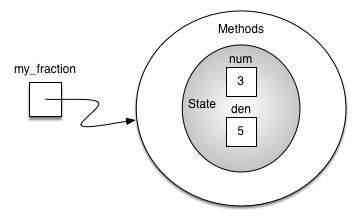
To create an instance of the Fraction class, we must invoke the constructor.
#include <iostream>
using namespace std;
class Fraction {
    public:
        Fraction(int top, int bottom) {
            num = top;
            den = bottom; }
    private:
        int num, den;
};
int main() {
    Fraction my_fraction(3, 5);   // invoke the constructor
    return 0; }
Abstraction and Encapsulation
Since we are using classes to create abstract data types, we should probably discuss the meaning of the word "abstract" in this context. Abstraction in object-oriented programming requires you to focus only on the desired properties and behaviors of the objects and discard what is unimportant or irrelevant.
The object-oriented principle of encapsulation is the notion that we should hide the contents of a class, except what is absolutely necessary to expose. Hence, we will restrict the access to our class as much as we can, so that a user can change the class properties and behaviors only from methods provided by the class.
Unlike Python, C++ has true private data: members declared in the private: section simply cannot be touched from outside the class — this is enforced by the compiler, not by a naming convention. Code must use the class's public methods to interact with each object's internal data.
Members declared after public: are accessible to everyone. If no access specifier is given, all members of a class are private by default.
#include <iostream>
using namespace std;

class Fraction {
    public:
        Fraction(int top, int bottom) {
            num = top;
            den = bottom;
        }
        int getNum() {
            return num;
        }
    private:
        int num, den;
};

int main() {
    Fraction a(3, 5);
    // cout << a.num << endl;   // compile error: num is private!
    cout << a.getNum() << endl;
    return 0;
}
3
Polymorphism
Polymorphism means the ability to appear in many forms. In OOP, polymorphism refers to the ability to process objects or methods differently depending on their data type, class, number of arguments, etc. For example, we can overload a constructor with different numbers and types of arguments to give us more optional ways to instantiate an object of the class in question.
In C++ this is done directly with constructor overloading: we simply provide several constructors with different parameter lists, and the compiler picks the right one based on the arguments — no special decorator or cls parameter is needed.
We can provide alternative constructors to handle fractions that are whole numbers and instances with no parameters given:
#include <iostream>
using namespace std;

class Fraction {
    public:
        Fraction(int top, int bottom) { num = top; den = bottom; }  // two arguments
        Fraction(int top) { num = top; den = 1; }                   // whole number
        Fraction() { num = 1; den = 1; }                            // no arguments: 1/1
    private:
        int num, den;
};

int main() {
    Fraction f1(3, 5);
    Fraction f2(5);
    Fraction f3;
    return 0;
}
The compiler selects which constructor to run by matching the number and types of the arguments at compile time. Each overloaded constructor must therefore have a distinguishable parameter list.
Calling the constructor with two arguments will invoke the first method, calling it with a single argument will invoke the second method, and calling it with no arguments will invoke the third method.
Using default parameters will accomplish the same task in this case. Since the class will behave the same no matter which implementation you use and the user will have no idea which implementation was chosen, this is an example of encapsulation.
class Fraction {
    public:
        Fraction(int top = 0, int bottom = 1) {
            num = top;
            den = bottom;
        }
    private:
        int num, den;
};

// int main() {
//     Fraction f1(3, 5);
//     Fraction f2(5);
//     Fraction f3;
//     return 0;
// }
Operator overloading
The next thing we need to do is implement the behavior that the abstract data type requires. To begin, consider what happens when we try to print a Fraction object.
#include <iostream>
using namespace std;

class Fraction {
    public:
        Fraction(int top, int bottom) { num = top; den = bottom; }
    private:
        int num, den;
};

int main() {
    Fraction my_fraction(3, 5);
    cout << my_fraction << endl;   // cout has no idea how to print a Fraction
    return 0;
}
The stream needs to be told how to convert our object into printable text. Python would fall back to a default __str__ and print an address; C++ simply refuses to compile. The fix is to overload the stream-insertion operator operator<< for our class.
Because operator<< needs to read the private members num and den, we can declare it as a friend of the class: a function granted access to the private section. This plays the role that __str__ plays in Python.
#include <iostream>
#include "pythonds3/cppds/fraction.hpp"   // Fraction with operator<< overloaded
using namespace std;
// https://github.com/phonchi/pythonds3/blob/master/cppds/fraction.hpp#L47
int main() {
    Fraction my_fraction(3, 5);
    cout << my_fraction << endl;
    cout << "I ate " << my_fraction << " of pizza" << endl;
    return 0;
}
3/5
I ate 3/5 of pizza
We can override many other methods for our new Fraction class. Some of the most important of these are the basic arithmetic operations.
#include <iostream>
using namespace std;

class Fraction {
    public:
        Fraction(int top, int bottom) { num = top; den = bottom; }
    private:
        int num, den;
};

int main() {
    Fraction f1(1, 4);
    Fraction f2(1, 2);
    Fraction f3 = f1 + f2;   // compile error: no operator+ yet
    return 0;
}
We can fix this by providing the Fraction class with a method that overloads the addition operator. In C++, this method is called operator+ and it takes one parameter representing the other operand — the object itself plays the role of the left operand.
#include <iostream>
#include "pythonds3/cppds/fraction.hpp"   // adds gcd() and operator+
using namespace std;
//https://github.com/phonchi/pythonds3/blob/master/cppds/fraction.hpp#L31
int main() {
    Fraction f1(1, 4);
    Fraction f2(1, 2);
    cout << f1 + f2 << endl;
    return 0;
}
3/4
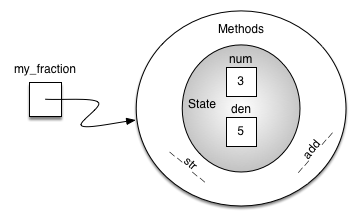
An additional group of methods that we need to include in our example Fraction class will allow two fractions to compare themselves to one another. Assume we have two Fraction objects, f1 and f2. In C++, f1 == f2 does not even compile until we define what equality means for our class.
This is stricter than Python, where the default == silently compares references (so-called shallow equality): two different objects with the same numerator and denominator would not be equal.
Note also a fundamental C++ difference: the assignment f3 = f1 copies the whole object (value semantics) rather than creating a second reference to the same object as Python does.
By overloading the operator== method we decide what equality means. Comparing the cross products of the two fractions gives deep equality — equality by the same value.
With num * other.den == other.num * den, the fractions 1/2 and 2/4 compare equal even though they are distinct objects with different member values — exactly the behavior our abstract data type requires.
#include <iostream>
#include "pythonds3/cppds/fraction.hpp"   // the complete class of this section
using namespace std;
// https://github.com/phonchi/pythonds3/blob/master/cppds/fraction.hpp#L37
int main() {
    Fraction x(1, 2);
    Fraction y(2, 3);
    cout << y << endl;
    cout << x + y << endl;
    cout << boolalpha << (x == y) << endl;

    Fraction z(2, 4);
    cout << (x == z) << endl;   // deep equality: 1/2 == 2/4
    return 0;
}
2/3
7/6
false
true
Running the program prints the fraction, the reduced sum 7/6, false for x == y, and true for x == z — deep (value) equality in action.
Exercise: Implement the remaining relational operators operator> and operator<. In the definition of fractions we assumed that negative fractions have a negative numerator and a positive denominator. Using a negative denominator would cause some of the relational operators to give incorrect results. In general, this is an unnecessary constraint. Modify the constructor to allow the user to pass a negative denominator so that all of the operators continue to work properly.
#include <iostream>
using namespace std;

class Fraction {
    // Your code here:
    //  - constructor that normalizes a negative denominator
    //  - bool operator>(Fraction& otherFrac)
    //  - bool operator<(Fraction& otherFrac)
};

int main() {
    Fraction a(3, 5);
    Fraction b(9, -10);
    cout << boolalpha << (a > b) << endl;
    return 0;
}
Expected output: true — since 9/(-10) is really -9/10, the fraction 3/5 is greater.
1.12. Inheritance: Logic Gates and Circuits
Inheritance is the ability of one class to be related to another class. Children inherit characteristics from their parents. Similarly, C++ child classes can inherit characteristic data and behavior from a parent class by deriving with class Child : public Parent. These classes are often referred to as subclasses and superclasses (or derived and base classes).
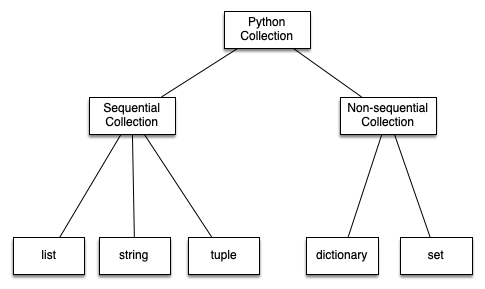
For example, a vector is a kind of sequential collection. In this case, we call the vector the child and the sequence the parent (or subclass vector and superclass sequence). This is often referred to as an Is-a relationship (the vector Is-a sequential collection).
Vectors, arrays, and strings are all examples of sequential collections. They all share common data organization and operations. However, each of them is distinct based on whether the collection can grow and what it may contain. The children all gain from their parents but distinguish themselves by adding additional characteristics.
By organizing classes in this hierarchical fashion, object-oriented programming languages allow previously written code to be extended to meet the needs of a new situation.
To explore this idea further, we will construct a simulation, an application to simulate digital circuits. The basic building block for this simulation will be the logic gate. These electronic switches represent Boolean algebra relationships between their input and their output.
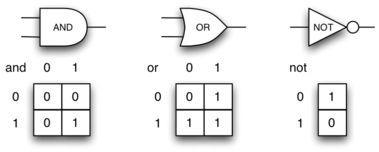
In order to implement a circuit, we will first build a representation for logic gates. Logic gates are easily organized into a class inheritance hierarchy:
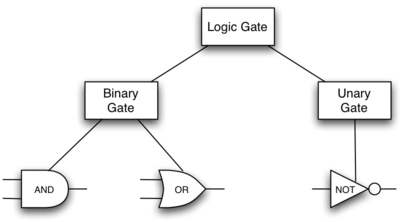
We can now start to implement the classes by starting with the most general, LogicGate. As noted earlier, each gate has a label for identification and a single output line. In addition, we need methods to allow a user of a gate to ask the gate for its label.
class LogicGate {
    public:
        LogicGate(string n) {
            label = n;
        }
        string getLabel() {
            return label;
        }
        int getOutput() {
            output = performGateLogic();
            return output;
        }
        virtual int performGateLogic() = 0;   // pure virtual function
    protected:
        string label;
        int output;
};
At this point, we do not implement performGateLogic() — we declare it virtual and set it = 0, making it a pure virtual function and LogicGate an abstract class: no plain LogicGate object can ever be created. The reason is that we do not know how each gate will perform its own logic operation. Those details will be included by each individual gate that is added to the hierarchy. (Also note protected: — like private, but visible to derived classes.)
Any new logic gate that gets added to the hierarchy will simply need to override performGateLogic(), and thanks to virtual dispatch it will be used at the appropriate time. Once done, the gate can provide its output value.
class Connector;   // forward declaration — defined later

class BinaryGate : public LogicGate {
    public:
        BinaryGate(string n) : LogicGate(n) {   // call the parent constructor
            pinA = NULL;
            pinB = NULL;
        }
    // https://github.com/phonchi/pythonds3/blob/master/cppds/gates.hpp#L34
        int getPinA();       // reads from the keyboard if no connector is attached
        int getPinB();
        void setNextPin(Connector* source) {
            if (pinA == NULL) {
                pinA = source;
            } else if (pinB == NULL) {
                pinB = source;
            } else {
                cout << "Cannot Connect: NO EMPTY PINS on this gate" << endl;
            }
        }
    protected:
        Connector* pinA;
        Connector* pinB;
};
The call to setNextPin() is very important for making connections. Note the pins are pointers to Connector — NULL means "nothing attached yet", exactly the role Python's None played.
class UnaryGate : public LogicGate {
    public:
        UnaryGate(string n) : LogicGate(n) {
            pin = NULL;
        }
        int getPin();
        void setNextPin(Connector* source) {
            if (pin == NULL) {
                pin = source;
            } else {
                cout << "Cannot Connect: NO EMPTY PINS on this gate" << endl;
            }
        }
    protected:
        Connector* pin;
};
The constructors in both of these classes start with an explicit call to the constructor of the parent class using the initializer list syntax : LogicGate(n) — the C++ counterpart of Python's super().__init__(lbl). The constructor then goes on to initialize the input pin pointers to NULL.
Now that we have a general class for gates depending on the number of input lines, we can build specific gates that have unique behavior. For example, the AndGate class will be a subclass of BinaryGate since AND gates have two input lines
#include <iostream>
#include "pythonds3/cppds/gates.hpp"   // the whole gate hierarchy of this section
using namespace std;
// https://github.com/phonchi/pythonds3/blob/master/cppds/gates.hpp#L98
int main() {
    AndGate g1("G1");
    cout << g1.getOutput() << endl;
    return 0;
}
Enter pin A input for gate G1: 0
0
The same development can be done for OR gates and NOT gates:
class OrGate : public BinaryGate {
    public:
        OrGate(string n) : BinaryGate(n) {}
        int performGateLogic() {
            int a = getPinA();
            int b = getPinB();
            if (a == 1 || b == 1) {
                return 1;
            } else {
                return 0;
            }
        }
};
class NotGate : public UnaryGate {
    public:
        NotGate(string n) : UnaryGate(n) {}
        int performGateLogic() {
            if (getPin()) {
                return 0;
            } else {
                return 1;
            }
        }
};
Each new gate only supplies its own performGateLogic() — everything else (labels, pins, output handling) is inherited. We will run all the gates together in the complete circuit program below.
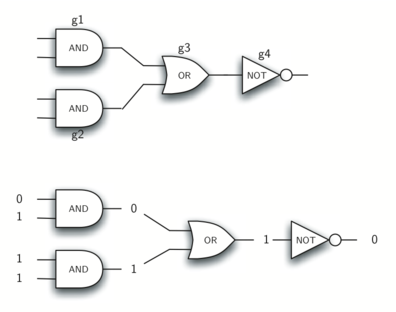
Now that we have the basic gates working, we can turn our attention to building circuits. In order to create a circuit, we need to connect gates together, the output of one flowing into the input of another. To do this, we will implement a new class called Connector.
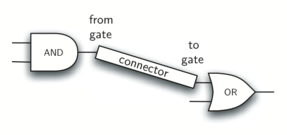
The Connector class will not reside in the gate hierarchy. It will, however, use the gate hierarchy in that each connector will have two gates, one on either end. This relationship is very important in object-oriented programming. It is called the Has-a relationship.
Now, with the Connector class, we say that a Connector Has-a LogicGate, meaning that connectors will have instances of the LogicGate class within them but are not part of the hierarchy.
class Connector {
    public:
        Connector(LogicGate* fgate, LogicGate* tgate) {
            fromGate = fgate;
            toGate = tgate;
            tgate->setNextPin(this);
        }
        LogicGate* getFrom() {
            return fromGate;
        }
    private:
        LogicGate* fromGate;
        LogicGate* toGate;
};
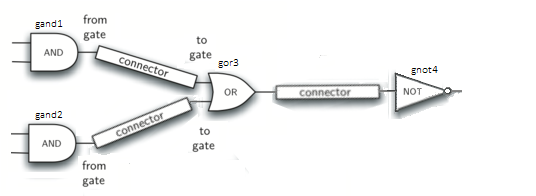
#include <iostream>
#include "pythonds3/cppds/gates.hpp"
using namespace std;

int main() {
    AndGate g1("gand1");
    AndGate g2("gand2");
    OrGate g3("gor3");
    NotGate g4("gnot4");
    Connector c1(&g1, &g3);
    Connector c2(&g2, &g3);
    Connector c3(&g3, &g4);
    cout << g4.getOutput() << endl;
    return 0;
}
Enter pin A input for gate gand1: 1
Enter pin B input for gate gand1: 0
Enter pin A input for gate gand2: 1
Enter pin B input for gate gand2: 0
1
References
- Textbook: Problem Solving with Algorithms and Data Structures using C++ (cppds), Chapter 1 — https://runestone.academy/ns/books/published/cppds/index.html